


PlugShare - EV & Tesla Map
4.63.21K Reviews
App Specs
- Version
- Varies with Device
- Updated On
- License
- Free
- Downloads
- 1,000,000+
- Developer
- PlugShare LLC
- Categories
- Maps & Navigation
- Platform
- Android, iOS
Screenshots
 Analysis by AppCompare
My first week with an EV charging map is usually a test of whether it answers a real question quickly: where can I charge, and what should I check before I drive there? PlugShare - EV & Tesla Map is built around those practical moments. I find it most useful not as a promise that every charger will work, but as a way to see options, compare locations, and learn from other drivers before committing to a stop.
Discovering Charging Stations Made Easy
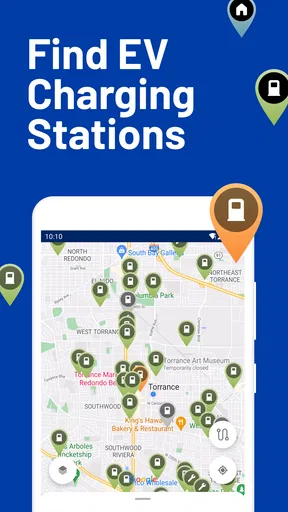
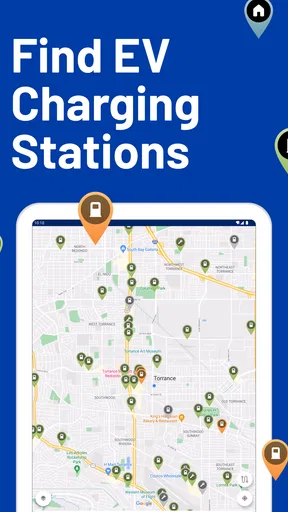
The first thing you’ll notice about PlugShare is how intuitive it is. When you open the app, it greets you with a clean map interface dotted with various charging stations around your location. It's like having a bird’s eye view of the EV world. Whether you’re planning a long road trip or just finding a spot to charge during your weekend errands, this app’s got you covered.
Useful From the First Search
PlugShare is a free Maps & Navigation app from PlugShare LLC, and its central job is easy to understand: help EV drivers find charging locations. The map makes the first session approachable, while the available filters let me narrow a broad search to stations that better suit my car and plans. I would not treat a pin on the map as a guarantee of access or availability, though. It is a starting point for checking the details, not a substitute for a sensible backup plan.
That distinction matters most when I am away from familiar streets. On a local errand, a nearby alternative may be easy to reach. On a longer drive, I would look ahead at more than one possible stop and check recent notes before choosing where to depend on a charge. This small habit makes the map more useful without asking me to trust it blindly.
Comprehensive Charging Network
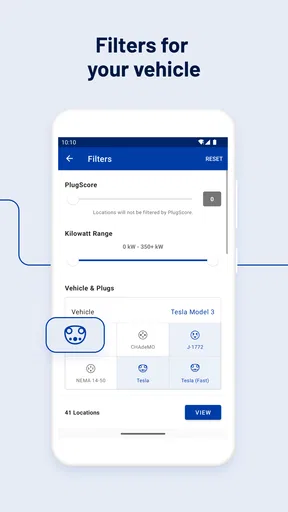
One of the standout features of PlugShare is its extensive database. It doesn’t matter if you’re rolling in a Tesla or any other EV; the app lists stations from multiple networks, including ChargePoint, EVgo, and more. You can filter by connector type, charging speed, and even network, ensuring you find exactly what you need.
Filters are especially valuable when a map is crowded with options that are not interchangeable. I would start with the connector my vehicle can use, then narrow by the speed or network that matters for that particular stop. If I am charging while shopping, a slower option may be perfectly practical; if I am trying to get back on the road, I would prioritize a stop that fits a tighter schedule. The best result is not always the closest pin, but the one that works with the car and the reason for stopping.
And get this, it’s not just limited to North America. PlugShare includes data from all over the world. So, whether you’re in Europe, Asia, or beyond, you can rely on it to guide you to the nearest plug-in point.
Worth Reading Before You Choose

EA SPORTS FC Mobile 26 Is a Bigger Football Game, but It Takes Time

Flipboard Shows What News Apps Must Do Beyond the Feed

Switching to Android Auto Means Rethinking Your Driving Routine

Google Calendar Makes a Crowded Week Easier to Manage

Ludo King Makes the Most of the Minutes Between Plans

Baby Panda World Brings Quick Play to Modern Phones, but Its Game Library Feels Busy
User Reviews and Photos
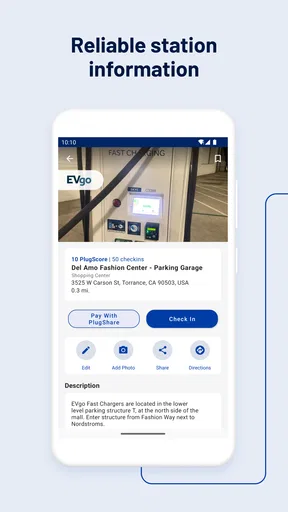
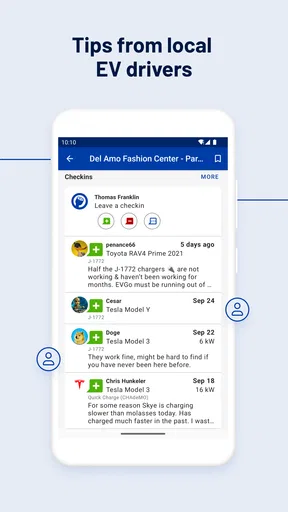
What really adds a personal touch to PlugShare are the user reviews and photos. Before heading to a charging station, you can check out what other users have to say. This feature helps avoid any unexpected surprises, like a broken charger or a sketchy location. Plus, the photos give you a visual idea of what to expect, making it easier to spot the station when you arrive.
I get the most value from treating comments as clues rather than guarantees. A recent report about a charger being out of service deserves attention; an older positive note can still be helpful for recognizing the site, but it may not tell me what is happening today. Photos can also answer small but useful arrival questions, such as whether a charger is tucked around the side of a building or set apart from the main parking area. Before setting off, I would check the date and context of a report rather than relying on a single sentence.
Planning Trips is a Breeze
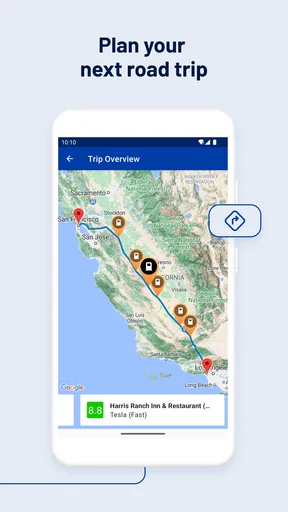
Planning a long-distance trip? No worries! PlugShare’s trip planner lets you map out your journey and locate charging stations along the way. You can adjust your route based on charge levels and preferred stations, making sure you never run out of juice. It’s like having a co-pilot who knows all the best charging spots.
For me, the planner is most useful as a way to shape a route, not as a reason to stop thinking about the drive. I would check the proposed stops against my own comfort level, expected travel conditions, and the places where I would actually want a break. If one location looks uncertain, choosing a second candidate before leaving can prevent a stressful last-minute search. Drivers who prefer a different route-planning tool can still use PlugShare as a focused second opinion on charging locations.
A Real-World Charging Routine
Imagine I am heading across town after work, with a grocery stop planned and no desire to spend the evening waiting around. I can look for a charging location near the errands, filter for a connector my car accepts, and read recent driver notes before deciding whether it is worth changing my route. If the comments suggest access is awkward or the site is unreliable, I can compare another nearby option instead of discovering the problem after arrival.
On a weekend trip, I would use the same routine earlier: map the broad route, identify likely charging breaks, inspect the station notes, and keep an alternate stop in mind. That is a more dependable use of a community-maintained map than picking the first result when the battery is already low. It also helps me decide whether a charger is convenient for a meal or a walk, rather than treating every stop as a purely technical decision.
Community and Connectivity
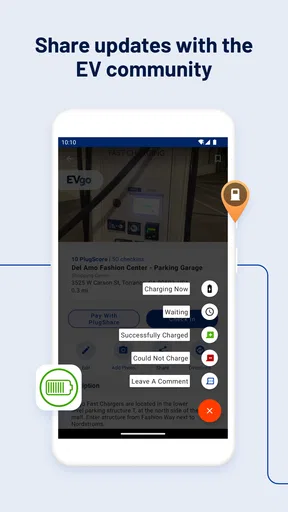
One of the coolest aspects is the community vibe. You can share your own experiences, leave tips for fellow drivers, and even report new charging spots. It’s all about helping each other out in this rapidly growing EV community. Plus, you can connect with other users, making it feel like you’re part of a larger movement towards sustainable driving.
The community element is more than a friendly extra: it is part of how the map stays informative in the real world. A short, specific report about access, a broken unit, or a confusing entrance can save another driver time. If I contribute, I would focus on details that will still make sense to someone arriving later, and avoid treating one visit as a permanent verdict on a location. The trade-off is clear: community information can be unusually practical, but its usefulness depends on how recent and precise the contributions are.
How It Fits Beside Other Navigation Options
A general navigation app is often the better choice when I mainly need directions, traffic context, or an easy route to an address. A charging-focused map earns a place beside it when the question is which station fits my vehicle, which network I prefer, or what other drivers have reported at a particular site. I would not expect one tool to replace every other part of a road-trip routine. PlugShare is strongest as the charging research layer: I can use it to compare stops, then rely on the navigation tool I already prefer to guide me there.
This distinction also helps avoid overloading the app with expectations. If I only drive a predictable local route and already know where I charge, I may not open it every day. If I travel to unfamiliar areas, borrow different parking options, or want to check a station before detouring, its specialized map and driver reports become more valuable. The right choice depends less on how often I open a map and more on how costly a wrong charging stop would be.
Who Will Get the Most from It
I would recommend trying it if you drive an EV and regularly leave your familiar charging area, especially if you like checking real-world notes before making a stop. It can also help a new EV owner build a clearer picture of charging options around home, work, and common destinations. The filters and map are useful when a driver needs to distinguish between locations rather than simply find any pin nearby.
It is less compelling for someone who rarely drives beyond a dependable home charger and has no interest in researching public stations. Drivers who need live certainty should also avoid making a community map their only source of reassurance. When timing is tight, I would confirm the practical details through the relevant charging network or another current source where possible, and keep a backup location in mind. That is not a reason to skip PlugShare; it is a sensible boundary for what any shared map can promise.
Minor Quirks
Of course, no app is perfect. While PlugShare is generally reliable, there are occasional hiccups, like outdated information or a station being occupied. But these are minor setbacks in the grand scheme of things, and the community often updates these entries swiftly.
In practice, those hiccups are not all equally minor. A stale note may only mean I need to inspect another option, while a charger that is busy or unavailable can disrupt a planned stop. I would therefore be cautious about building a tight schedule around one location, particularly on a route with few convenient alternatives. Checking more than one candidate is a small amount of preparation that can make the app’s information much more useful.
What Keeps It Useful Over Time
The novelty of exploring a charging map wears off, but the recurring value comes from having a familiar place to check when plans change. I may not need it on a routine day, yet it can become part of my travel checklist: search the area, filter for a suitable connector, read recent reports, and note a fallback. That repeatable workflow is more valuable than simply browsing pins, because it turns the map into a practical habit rather than another app I open without a clear purpose.
PlugShare has been around since Jul 26, 2011, and it has a 4.7 average from around 49,000 ratings, with over 1 million installs. Those figures suggest a well-established audience, but I would still judge a particular station by its details and recent reports. The app is free to install, has a Teen age rating, and offers in-app purchases ranging from $1.49 to $14.99 per item. I would begin with the free experience and decide whether any optional purchase is worthwhile for my own routine, rather than assuming it is necessary to find a charger.
Final Thoughts
Overall, PlugShare - EV & Tesla Map is a game-changer for EV drivers. Its user-friendly design, extensive network, and community-driven approach make it an essential tool for anyone in the electric vehicle world. Whether you’re a seasoned EV driver or just starting your journey, PlugShare is your trusty sidekick on the road to a greener future. So, plug in, power up, and let’s hit the road!
My more measured verdict is that it earns lasting space when I treat it as a practical reference, not a guarantee. Its strongest recurring advantages are the ability to filter charging choices, learn from driver contributions, and prepare for unfamiliar routes. Its main limitation is the uncertainty that comes with information that can change between visits. If you are comfortable checking details and keeping a backup in mind, it can make public charging decisions feel less like guesswork. If you need one source to promise availability, or rarely need public charging at all, another approach may suit you better.
Pros
- Comprehensive charging station database.
- User-friendly interface with easy navigation.
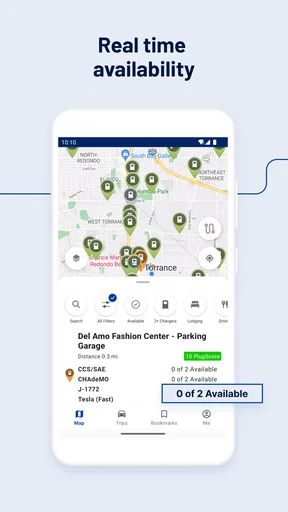
- Real-time availability updates for stations.
- Community-driven reviews and tips.
- Supports multiple EV models and brands.
Cons
- Occasional inaccuracies in station details.
- Some features require a paid subscription.
- Limited offline functionality.
- Inconsistent user review quality.
- Notifications can be overly frequent.
FAQs for PlugShare - EV & Tesla Map
What is PlugShare and how does it work?
PlugShare is a comprehensive app designed to help electric vehicle (EV) owners find charging stations. Users can search for nearby locations, view station details, and even check real-time availability. The app also lets users contribute information by updating station status or adding new locations, making it a community-driven resource.
Is PlugShare free to use, or are there any hidden fees?
PlugShare is free to download and use, offering a wide range of features at no cost. While the app itself does not charge fees, users should be aware that charging at certain stations might incur costs, depending on the station operator. Always check station details for pricing information.
Can I use PlugShare for planning long-distance trips with an EV?
Yes, PlugShare is an excellent tool for planning long-distance EV trips. It allows users to map out routes with charging stations strategically placed along the way. The app provides details about each station, including connector types and availability, ensuring you can plan your journey efficiently.
How accurate is the information on charging station availability in PlugShare?
PlugShare relies on user contributions and partnerships with charging networks to provide up-to-date information. While it strives for accuracy, availability data might not always be real-time. Users are encouraged to update station statuses and report any inaccuracies to maintain the app's reliability.
Does PlugShare support all types of electric vehicles and charging connectors?
PlugShare supports a wide range of electric vehicles, including Tesla models, and offers information on various charging connectors like CHAdeMO, CCS, and Tesla Supercharger. Users can filter search results based on their vehicle type and preferred connector to find compatible stations easily.


